Audio Recording Timer
Audio Recording Timer starts Obsidian’s core Audio recorder with a selected end time. When the timer finishes, it stops recording automatically, which helps with meetings, lectures, interviews, and quick voice notes.
Main Features
- Start Obsidian’s core Audio recorder with a timer
- Choose a rounded end time, add time, or edit the final end time directly
- Show remaining time in the status bar on desktop
- Stop or extend an active recording from the plugin icon
- Works on Obsidian desktop and mobile
- No network access and no telemetry
How To Use
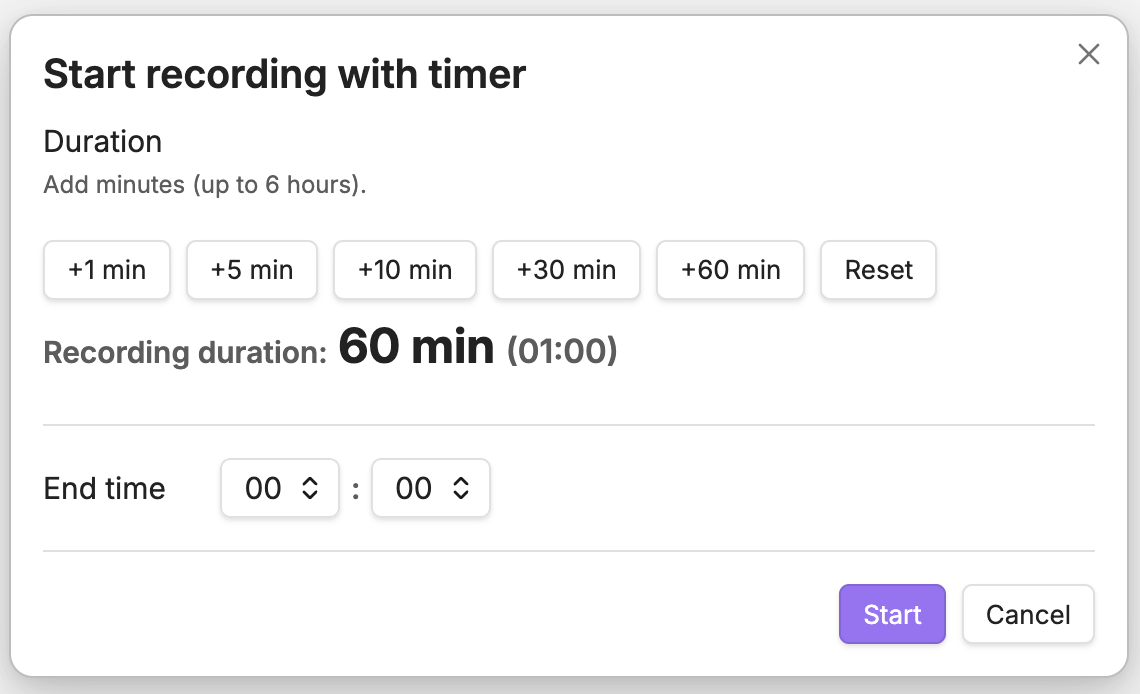
Open the timer icon and choose a Quick end time. Choices begin at the first 15-minute clock boundary that is at least 15 minutes from now. Use Add time to move the choice later, edit the final End time directly, or choose Reset to start over.
The default choices cover approximately two hours. Settings can extend that range in 30-minute increments up to 5 hours 30 minutes, while the overall recording-timer cap remains six hours.
While recording, click the timer icon again to stop immediately or extend the recording.
Screenshot
Settings And Notes
This plugin controls Obsidian’s core Audio recorder plugin.
Before using it, enable Audio recorder in Obsidian’s core plugin settings.
By default, the plugin calls these command IDs:
| Action | Command ID |
|---|---|
| Start recording | audio-recorder:start |
| Stop recording | audio-recorder:stop |
If needed, you can change the command IDs in Obsidian’s Audio Recording Timer settings.
If you want a single recording UI, you can hide Obsidian’s core recorder ribbon icon. If the operating system suspends Obsidian, such as during sleep, the plugin runs the stop command immediately after the app resumes.
Installation
Install the plugin in either of these ways:
- From Obsidian: Open Settings → Community plugins → Browse, search for
Audio Recording Timer, then install and enable it. - From the Community site: Open the Audio Recording Timer Community Plugin page and select
Add to Obsidian. Obsidian opens so you can install the plugin.
Privacy And Compatibility
The plugin itself has no network access, no telemetry, no ads, no account requirement, and no paid features. It uses the microphone through Obsidian’s core Audio recorder, and recorded files are created by Obsidian inside your vault.
- Obsidian 1.8.0+
- Desktop and mobile
- License: MIT